Wednesday, February 17, 2010

GateIn Portal now available in Nepali

Thanks to Mr. Bimal Thapa, an OSS contributor from Nepal, GateIn portal project is now partially translated into Nepali. Here is one screen shot:

Of course being a Nepali, I am really proud of this but what makes it even sweeter is that I met Bimal as part of my Open Source Software (OSS) event during my last visit to Nepal. I would like to think that the event is partially responsible to bring Bimal jee on board. ;-) Please help me spread the word.

If you want to join the fun, please contact me. There are still some polishing to do.

Saturday, January 16, 2010

Official Google Blog: A new approach to China

Official Google Blog: A new approach to China

Wednesday, January 13, 2010

Looking for Volunteers to Translate GateIn into Nepali

This message goes out to all Nepali OSS community. Currently a open source portal project called GateIn (www.gatein.org) is looking for volunteers to translate GateIn into many languages. Being somebody who is involved with this project and being a Nepali, it will give me an immense pleasure to see GateIn translated to Nepali as well. The details of task is at http://community.jboss.org/wiki/TranslatingGateIn . Please shoot me an email if you are interested.

Your rewards:
1. You can call yourself a OSS committer and brag about it.
2. Feel good that you are able to do a bit to expand Nepal's footprint in OSS community
3. Acknowledgment from the project lead
4. A project T-Shirt

Wednesday, December 23, 2009

Book Review: Packt's JBoss Richfaces 3.3

Packt folks sent me a copy of "JBoss Richfaces 3.3" so that I could do a review of the book in my blog. I am almost done with the book and probably would have started on writing review over the holidays break but another review came up which pretty much is in line with what I have in mind. You can read it at http://edemmorny.wordpress.com/2009/12/22/book-review-packts-jboss-richfaces-3-3/ . Thanks Edem for saving me some typing. I would still like to summarize the book in few bullet points:

Good Points:
  • A complete application from start to finish along with Seam and JPA integration.
  • Good explanation of some core Richfaces concepts such as placeholder, ajaxSingle, region, process
  • Skinning support and how you can create yours
  • Good use case for Poll, Push, data iteration component and its partial update
Not so good points:
  • First five chapters of book is equally split between Richfaces, Seam and JPA. Given that this book is for beginner, these other frameworks add to the complexity and more than likely will confuse reader.
  • Seam is a great framework but it's not a must have to use Richfaces. The book gives you an impression that you can not get easily started with Richfaces without Seam and seamgen.
How would I have written this book:

Given that the book is tailored towards readers who are familiar with JSF 1.2 ,I would have started with a simple JSF project and added Richfaces feature
on top of the project. Then describe how Richfaces lifecycle fits into JSF lifecyle and so on. This way transition is smooth and helps a reader see how Richfaces fits well with JSF. Most of users who post questions in Richfaces user forum fall into the group who know JSF and want to know more about Richfaces.

I wish you happy holidays and a great new year.

Tuesday, August 25, 2009

Richfaces: immediate vs bypassUpdates attributes

If you are familiar with JSF then you know when to use immediate attribute. If not, here is a quick refresher. JSF has six different phases:
  1. Restore View - Creates or restores the previous page.

  2. Apply Request Values - Set component submitted values to request values.

  3. Process Validations - Convert and validate component values. Set component values to submitted values if valid.

  4. Update Model Values - Set backing bean values to component values.

  5. Invoke Application - Execute actionListeners and actions.

  6. Render Response - Return response.

When immediate is set to true, action components call navigation handler just after 2nd phase and skip 3-5 phases. The most common usecase is with cancel button on a form i.e. when user clicks on Cancel button, you don't want to force user to enter correct values.

Now with bypassUpdates attribute, only 4-5 phases are skipped; validation happens as usual. To credit Nick Belaevski for giving a concrete example of a sign up form, you can have one button in form to cancel (set immediate=true) and another checks whether screenname is already taken (set bypassUpdates=true). Obviously, setting both to true for same component does not make sense. If you are still not clear, here is code snippet from org. ajax4jsf.component.AjaxActionComponent
if (event instanceof ActionEvent) {
if (event.getComponent() == this) {
if (isImmediate()) {
event.setPhaseId(PhaseId.APPLY_REQUEST_VALUES);
} else if (isBypassUpdates()) {
event.setPhaseId(PhaseId.PROCESS_VALIDATIONS);
} else {
event.setPhaseId(PhaseId.INVOKE_APPLICATION);
}
}
// UICommand set Phase ID for all ActionEvents - bypass it.
getParent().queueEvent(event);
}
It should be crystal clear now...at least it was for me.

Tuesday, August 4, 2009

Now you can tweet from JBoss Portal

Introducing Twitter portlet for JBoss Portal and Enterprise Portal platform. It's based on twitter4j, Richfaces, JBoss Portlet Bridge.

Using this portlet, you can
  • Update your status
  • Get messages that are sent directly to you (e.g. @prabhatjha in my case)
  • Get list of folks who you are following and get their latest status. List is sortable.
I would say that this is basic but my goal was to have something for folks to get started with. twitter4j exposes various twitter api which you can use to customize this portlet for your need. I will leave that as an exercise for reader (I always wanted to say that ;-) ) Here are some screen shots:


You can grab the code from http://anonsvn.jboss.org/repos/qa/prabhat/twitter-portlet/ But this portlet can very well run on other portal servers as well if you know what deployment descriptors you need to modify.

Wednesday, July 8, 2009

From JSF to Richfaces to Richfaces Portlet

We are going to start with a very simple JSF web application then convert that to a very simple Richfaces web application and then ultimately convert that Richfaces web application to Richfaces Portlet. This tutorial assumes that you have basic knowlege of JSF. All code used in this tutorial are at http://anonsvn.jboss.org/repos/qa/prabhat/. This application simply gives you some financial advice based on your age and your current savings. We all need some financial advice these days, don't we? ;-)

Converting a JSF application to Richfaces is a 3 step process:

1. Add Richfaces filter and some default parameters:

<!-- Plugging the "Blue Sky" skin into the project -->
<context-param>
<param-name>org.richfaces.SKIN</param-name>
<param-value>blueSky</param-value>
</context-param>

<!-- Making the RichFaces skin spread to standard HTML controls -->
<context-param>
<param-name>org.richfaces.CONTROL_SKINNING</param-name>
<param-value>enable</param-value>
</context-param>
<filter>
<display-name>RichFaces Filter</display-name>
<filter-name>richfaces</filter-name>
<filter-class>org.ajax4jsf.Filter</filter-class>
</filter>

<filter-mapping>
<filter-name>richfaces</filter-name>
<servlet-name>Faces Servlet</servlet-name>
<dispatcher>REQUEST</dispatcher>
<dispatcher>FORWARD</dispatcher>
<dispatcher>INCLUDE</dispatcher>
</filter-mapping>

2. Add Richfaces binaries to WEB-INF/lib:
You need three jars:

richfaces-api.jars
richfaces-ui.jar
richfaces-impl.jar

3. Add Richfaces components to your page:
You need to import two tag libraries. For a JSP page, you would need

<%@ taglib uri="http://richfaces.org/rich" prefix="rich"%>
<%@ taglib uri="http://richfaces.org/a4j" prefix="a4j"%>

For an XHTMl page, you would need

<xmlns:a4j="http://richfaces.org/a4j">
<xmlns:rich="http://richfaces.org/rich">

Just doing these changes will make your page look pretty i.e. Rich.


From
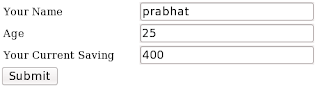


To



Note:
1. If you deploy these app into JBoss AS, you do not need to bundle jsf jars in your war but you need them when deploying in tomcat.
2. Adding Richfaces config and binaries to an existing JSF project is very simple using JBoss Tools or JBDS. You simply add "Richfaces Capabilities".

Converting a Richfaces application to Richfaces Portlet

Since Portlets run on portal server, converting a web app to portlet is not that straightforward. I guess that's why there is no add "Portlet Capabilities" in JBoss Tools/JBDS. But it's equally easy to get started using Maven archetypes. Portlet based on JSF/Richfaces/Struts run on a portal server through portlet bridge. There is a separate project called JBoss Portlet Bridge which allows you to do that that for JSF/Richfaces/Seam based portlets. This project provides different maven archetypes to get you quickly started with these portlets. For richfaces based portlet, you would need to do


mvn archetype:generate -DarchetypeGroupId=org.jboss.portletbridge.archetypes -DarchetypeArtifactId=richfaces-basic -DarchetypeVersion=1.0.0.CR2 -DgroupId=org.jboss.test -DartifactId=richfaces-portlet -DarchetypeRepository=http://repository.jboss.org/maven2/

The archetype will create all required deployment descriptors portlet.xml,portlet-instances.xml, jboss-portlet.xml which you of course would need to update. We are going to import richfaces pages we created previously to this project and modify deployment descriptors accordingly. The important changes are portlet and portal server specific deployment descriptors and hooking up bridge with JSF.

1. Portlet Bridge's view handler and state manager on top of JSF/Richfaces
Modify faces-config.xml so that it has

<application>
<view-handler>org.jboss.portletbridge.application.PortletViewHandler</view-handler>
<state-manager>org.jboss.portletbridge.application.PortletStateManager</state-manager>
</application>

2. The Bridge Portlet to wrap xhtml as a view state of portlet

<portlet>
<portlet-name>SimpleRichfacesPortlet</portlet-name>
<portlet-class>javax.portlet.faces.GenericFacesPortlet</portlet-class>
<init-param>
<name>javax.portlet.faces.defaultViewId.view</name>
<value>/introduction.xhtml</value>
</init-param>
<init-param>
<name>javax.portlet.faces.preserveActionParams</name>
<value>true</value>
</init-param>
<expiration-cache>-0</expiration-cache>
<supports>
<mime-type>text/html</mime-type>
<portlet-mode>VIEW</portlet-mode>
</supports>
<portlet-info>
<title>Simple Richfaces Portlet</title>
</portlet-info>
</portlet>

We are configuring that GenericFacesPortlet is the portlet, it supports view mode and for default view, we are going to use introduction.xhtml that we created in JSF and Richfaces.

3. portlet-instances.xml does not change in this context i.e it's same as that of any java portlet

4. Inject needed Richfaces javascripts using jboss-portlet.xml

<portlet>
<portlet-name>SimpleRichfacesPortlet</portlet-name>
<header-content>
<script src="/faces/rfRes/org/ajax4jsf/framework.pack.js" type="text/javascript"></script>
<script src="/faces/rfRes/org/richfaces/ui.pack.js" type="text/javascript"></script>
<link rel="stylesheet" type="text/css" href="/faces/rfRes/org/richfaces/skin.xcss">
</header-content>
</portlet>


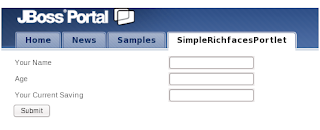
This portlet when deployed to JBoss Portal looks like: